


Embedded in the tyDirs are the tyDbs. This is where the real data is actually hiding out.
While poking through the MFS [Hack #88] you are inevitably going to run into objects. The objects, or tyDbs as they are called, are the database objects holding the real information that the filesystem directories (tyDirs) are just organizing into a simple hierarchy.
You can peek at an object using the TiVo shell's dumpobj command. dumpobj does exactly as its name suggests: reach into the MFS database for a specified filesystem ID (FSID), extract appropriate metadata, and dump it to the screen in human-readable form.
Let's take a look at a rundown of the first television show in my /Recording/NowShowingByTitle directory. From the TiVo shell (type tivosh at the Bash prompt if you're not already in tivosh), run it on one of your FSIDs, like so:
% dumpobj 1717520
Recording 1717520/10 {
  ActualShowing  = 1717520/16
  BitRate        = 0
  Bookmark       = 1717520/19
  DeletionDate   = 24855
  ExpirationDate = 12213
  ExpirationTime = 9000
  IndexPath      = /Recording/Active/1:12211:08998:1717520 /Recording/
NoReRecord/12919640:2:99999:01717520 /Recording/TmsId/SH5785730000:87788:
91001:1717520 /Recording/NowShowingByClassic/2:87788:91001:1717520 /
Recording/NowShowingByExpiration/2:12213:09000:1717520 {/Recording/
NowShowingByTitle/1:2003 MTV MOVIE AWARDS:87788:91001:1717520} /Recording/
DiskUsed/10/1717520:2842624
  IndexUsed      = 1717520/11 1717520/12
  NSecondsWatched = 3539
  NVisit         = 1
  Part           = 1717520/13 1717520/15 1717520/17 1717520/18 1717520/20
1717520/21
  RecordQuality  = 75
  RecordingBehavior = 1717520/12
  Score          = 0
  SelectionType  = 3
  Showing        = 1717520/11
  StartDate      = 12211
  StartTime      = 8998
  State          = 4
  StopDate       = 12211
  StopTime       = 16200
  StreamFileSize = 2842624
  UsedBy         = 1
  Version        = 56
}
Out comes all the attributes associated with this television show. Notice the title fragment "MTV MOVIE AWARDS" (/Recording/NowShowingByTitle/1:2003 MTV MOVIE AWARDS), the number of seconds I've already watched (NSecondsWatched = 3539), and other assorted details.
It's also worth mentioning that our friend TiVoWeb will do the same thing. Use the web-based MFS browser to click your way to one of the tyDb objects, and you should see something like Figure 7-2.
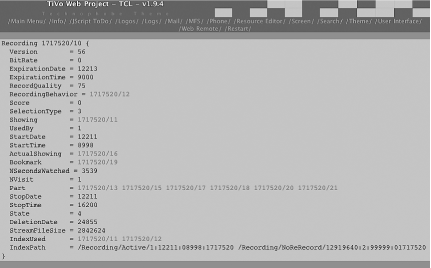
That said, if all data about the show is in the MFS database, where's the full title of the show? The guest stars? Television channel from which it was recorded? If you look closely at the object dump, you may well see what appear to be FSIDs; in fact, that's what they are.
This is where the TiVo shell and command line has one leg up on TiVoWeb. You could go through and dumpobj each of the associated FSIDs, but you'll no doubt find even more to comb through. You could also click through on TiVoWeb, but that is just going to get frustrating. There is a short cut: dumpobj takes a closure flag, telling it to dump all the FSIDs it finds along the way, starting with the FSID you provide. It's a long list but a pirate's booty of information:
% dumpobj -closure  1717520
Recording 1717520/10 {
  ActualShowing  = 1717520/16
  BitRate        = 0
  Bookmark       = 1717520/19
  DeletionDate   = 24855
  ExpirationDate = 12213
  ExpirationTime = 9000
  IndexPath      = /Recording/Active/1:12211:08998:1717520 /Recording/
NoReRecord/129196
40:2:99999:01717520 /Recording/TmsId/SH5785730000:87788:91001:1717520 /
Recording/NowSho
wingByClassic/2:87788:91001:1717520 /Recording/NowShowingByExpiration/2:
12213:09000:171
7520 {/Recording/NowShowingByTitle/1:2003 MTV MOVIE AWARDS:87788:91001:
1717520} /Record
ing/DiskUsed/10/1717520:2842624
  IndexUsed      = 1717520/11 1717520/12
  NSecondsWatched = 3539
  NVisit         = 1
  Part           = 1717520/13 1717520/15 1717520/17 1717520/18 1717520/20
1717520/21
  RecordQuality  = 75
  RecordingBehavior = 1717520/12
  Score          = 0
  SelectionType  = 3
  Showing        = 1717520/11
  StartDate      = 12211
  StartTime      = 8998
  State          = 4
  StopDate       = 12211
  StopTime       = 16200
  StreamFileSize = 2842624
  UsedBy         = 1
  Version        = 56
}

Showing 1717520/16 {
  Bits           = 2
  Date           = 12211
  Duration       = 7200
  Program        = 1691635/-1
  Station        = 2086/-1
  Time           = 9000
}

Bookmark 1717520/19 {
  TimeMs         = 4171221
}

Showing 1717520/11 {
  Bits           = 2
  Date           = 12211
  Duration       = 7200
  IndexUsedBy    = 1717520/10
  Program        = 1691635/-1
  Station        = 2086/-1
  Time           = 9000
}

RecordingBehavior 1717520/12 {
  DiskBehavior   = 5
  IndexUsedBy    = 1717520/10
  PresentationBehavior = 1
  ProgramGuideBehavior = 1
  TunerBehavior  = 1
}

RecordingPart 1717520/13 {
  Begin          = 0
  CommercialSkipOffset = 0
  End            = 1318759
  File           = 1717637
}

RecordingPart 1717520/15 {
  Begin          = 1319259
  CommercialSkipOffset = 0
  End            = 2652833
  File           = 1717645
}

RecordingPart 1717520/17 {
  Begin          = 2653334
  CommercialSkipOffset = 0
  End            = 3984672
  File           = 1717665
}

RecordingPart 1717520/18 {
  Begin          = 3985172
  CommercialSkipOffset = 0
  End            = 5316511
  File           = 1717666
}

RecordingPart 1717520/20 {
  Begin          = 5317011
  CommercialSkipOffset = 0
  End            = 6646248
  File           = 1717667
}

RecordingPart 1717520/21 {
Begin          = 6646848
  CommercialSkipOffset = 0
  End            = 7201392
  File           = 1717668
}

Program 1691635/11 {
  ColorCode      = 4
  DescLanguage   = English
  Description    = {The Shrine Auditorium in Los Angeles; hosts Justin
Timberlake and Seann William Scott.}
  Genre          = 9 100 1000
  IndexPath      = /Server/12919640
  IsEpisode      = 1
  OriginalAirDate = 12208
  Series         = 1691634/-1
  ServerId       = 12919640
  ServerVersion  = 4
  ShowType       = 3
  SourceType     = 1
  Title          = {2003 MTV Movie Awards}
  TmsId          = SH5785730000
  Version        = 1
}

Station 2086/15 {
  Affiliation    = Satellite
  AffiliationIndex = 39
  CallSign       = MTV
  City           = {New York}
  Country        = {United States}
  DmaNum         = 0
  IndexPath      = /StationTms/10986:826 /Server/928
  LogoIndex      = LogoSpace=Tivo    LogoIndex=0
  Name           = {MTV - Music Television}
  ServerId       = 928
  ServerVersion  = 80
  State          = NY
  TmsId          = 10986
  Version        = 10
  ZipCode        = 10036
}

Series 1691634/11 {
  Episodic       = 0
  Genre          = 9 100 1000
  IndexPath      = /Server/12919853
  ServerId       = 12919853
  ServerVersion  = 2
}
The Program node (FSID 1691635) holds the title and full description of the show. The Station node (FSID 2086) tells us that the show was recorded off MTV. And that's absolutely everything TiVo knows about the object we asked for. The question is, what do you do with it? See the following hacks for some answers.
 |
|
|
| Top |