


Listen to your email as an MP3 audio stream—just because you can.
Just when you thought pictures of your email [Hack #61] was over the top, someone had to go and take it even further. Instead of rendering your email to a PNG image, let's render it to audio.
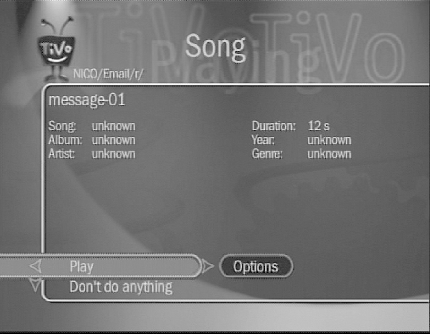
A combination of the script from [Hack #61] and the Microsoft Speech Object Library (http://www.microsoft.com/speech/) reads the first few lines of each email message, rendering them as a temporary WAV audio file. That WAV file can then be converted using bladeenc (http://bladeenc.mp3.no/) or the like to an MP3 file that TiVo can understand and play. If all goes well, we can move the MP3 into an area that can be "seen" by the TiVo Media Desktop.
|
Save the following code to a file named mail2mp3.pl somewhere on your PC hard drive, and follow the configuration instructions from [Hack #61]:
#!c:\perl\bin\perl.exe

use strict;
use Cwd;
use File::Copy;
use File::Path;
use File::Spec;
use Mail::POP3Client;
use Mail::Internet;
use LWP::Simple;
use Win32;
use Win32::OLE;
use Win32::OLE::Const qq{Microsoft Speech Object Library};

use constant DESTINATION  => q{D:\MP3\TiVo};
use constant PREVIEW_LINES => 30;

my @accounts = (
 {
 DESC   => q{thoellri@foobar.com},
 USER   => "thoellri",
 AUTH_MODE => "PASS",
 PASSWORD => "password",
 HOST   => "pop3.foobar.com"
 },
 {
 DESC   => q{tobias@somewhere.com},
 USER   => "tobias",
 AUTH_MODE => "PASS",
 PASSWORD => "password",
 HOST   => "mail.somewhere.com"
 },
);

for my $account (@accounts) {
 # erase existing messages
  rmtree([ File::Spec->catfile(DESTINATION, qq{Email}, $account->{DESC}) ],[RETURN]
    0, 0);
  my $pop = new Mail::POP3Client (%$account);
  unless ($pop) { warn "Couldn't connect\n"; next; }
  my $count = $pop->Count;
  if ($count <0) { warn "Authorization failed"; next; }
  next if($count == 0); # no new messages
 # create new directory for messages
  mkpath([ File::Spec->catfile(DESTINATION, qq{Email}, $account->{DESC}) ],[RETURN]
    0, 0711);
  for my $num (1..$count) {
    my @preview=$pop->HeadAndBody($num,100);
    my $mail=Mail::Internet->new(\@preview);
    my $mp3file=mail2mp3($mail);
    next unless defined($mp3file);
    my $out=File::Spec->catfile(DESTINATION, qq{Email}, $account->{DESC},
                  qq{message-}.sprintf("%02d",$num).qq{.mp3});
    copy($mp3file,$out);
    unlink($mp3file);
  }
  $pop->Close;
}

sub mail2mp3 {
  my($m)=@_;
  my $header=$m->head(  );
  my $type=Win32::OLE->new('SAPI.SpAudioFormat');
  $type->{Type}=SAFT32kHz16BitMono;
  my $stream=Win32::OLE->new('SAPI.SpFileStream');
  $stream->{Format}=$type;
  $stream->Open("output$$.wav",SSFMCreateForWrite,undef);
  my $speech=Win32::OLE->new('SAPI.SpVoice');
  $speech->{AudioOutputStream}=$stream;
  $speech->Speak(qq{From: }.$header->get('From'),SVSFDefault);
  $speech->Speak(qq{Subject: }.$header->get('Subject'),SVSFDefault);
  my($lines);
  foreach my $line (@{$m->body(  )}) {
    chomp($line);
    $speech->Speak($line." ",SVSFDefault);
    last if($lines++>= PREVIEW_LINES);
  }
  $speech->WaitUntilDone(-1);
  $stream->Close(  );
  return undef unless (-f "output$$.wav");
 # here we call out to the command line mp3 encode
  system(qq{bladeenc -quiet -nocfg -quit output$$.wav output$$.mp3});
  unlink(qq{output$$.wav});
  return undef unless (-f "output$$.mp3");
  return File::Spec->catfile(getcwd,qq{output$$.mp3});
}
Run
the script from the DOS prompt (Start  Run...
command) on your Windows PC or from the
Terminal (Applications Utilities Terminal)
under Mac OS X, like so:
Run...
command) on your Windows PC or from the
Terminal (Applications Utilities Terminal)
under Mac OS X, like so:
perl mail2mp3.pl
With this magic running, your email will be downloaded but not deleted. Your computer will start silently talking to itself and recording itself (see Figure 4-28). It'll then compress all the sounds down to a basket-full-o'-MP3s that your TiVo would be content to sit and play all day and night.
Lame, pronounced: "Lame Ain't an MP3 Encoder" (http://lame.sourceforge.net/)
—Tobias Hoellrich
 |
|
|
| Top |
