

| [ Team LiB ] |
|
Hack 96 Compare International Sales
Find out what products are hot on either side of the pond with Amazon locale-based queries. Why are some albums more popular in the U.K. than in the U.S.? This hack can't answer that question, but it can point out what the differences are. It uses two features of AWS requests, sort and locale, to generate parallel lists of bestsellers by artist. 96.1 The CodeThis ASP code makes two ArtistSearch requests. Both are sorted by sales rank, and the only difference between the two is the setting for the locale. In the first query, locale is left blank, for the default Amazon.com store. The other query sets the locale to uk, searching Amazon.co.uk. Create a file called us_vs_uk.asp with the following code: <html>
<head>
<title>International Sales</title>
</head>
<body>
<%
Dim arUSResults(10,4)
Dim arUKResults(10,4)
Sub AmazonTopArtist(artist,locale)
' Set Associate ID and Developer Token
AssociatesID = "insert associate tag "
DeveloperToken = "insert developer token "
' Form the request URL
XMLURL = "http://xml.amazon.com/onca/xml3" & _
"?t=" & AssociateID & _
"&dev-t=" & DeveloperToken & _
"&page=1" & _
"&f=xml" & _
"&mode=music" & _
"&type=lite" & _
"&sort=+salesrank " & _
"&ArtistSearch=" & Server.URLEncode(artist)
If locale = "uk" Then
XMLURL = XMLURL & "&locale=uk "
End If
Set xmlhttp = Server.CreateObject("Msxml2.SERVERXMLHTTP")
xmlhttp.Open "GET", XMLURL, false
xmlhttp.Send(Now)
' Issue the request and wait for the response
Set ProductInfo = xmlhttp.ResponseXML
Set Details = ProductInfo.SelectNodes("//Details")
For x = 0 to (Details.length-1)
If locale = "uk" Then
arUKResults(x,1) = Details(x).selectSingleNode("ProductName").text
arUKResults(x,2) = Details(x).selectSingleNode("Asin").text
arUKResults(x,3) = Details(x).selectSingleNode("ImageUrlSmall").text
arUKResults(x,4) = Details(x).getAttribute("url")
Else
arUSResults(x,1) = Details(x).selectSingleNode("ProductName").text
arUSResults(x,2) = Details(x).selectSingleNode("Asin").text
arUSResults(x,3) = Details(x).selectSingleNode("ImageUrlSmall").text
arUSResults(x,4) = Details(x).getAttribute("url")
End If
Next
Set Details = Nothing
Set ProductInfo = Nothing
Set xmlhttp = Nothing
End Sub
strArtist = request("artist")
Call AmazonTopArtist(strArtist,"us")
Call AmazonTopArtist(strArtist,"uk")
response.write "<table border=""1"" cellpadding=""5"">"
response.write "<tr><th>UK Top Sales</th><th>US Top Sales</th></tr>"
response.write "<tr>"
For y = 0 To 9
response.write "<tr>"
response.write "<td align=""center"" valign=""top"">"
response.write "<a href=""" & arUKResults(y,4) & """>"
response.write arUKResults(y,1)
response.write "</a><br><br>"
response.write "<img border=""0"" src=""" & arUKResults(y,3) & """>"
response.write "</td>" & vbCrLf
response.write "<td align=""center"" valign=""top"">"
response.write "<a href=""" & arUSResults(y,4) & """>"
response.write arUSResults(y,1)
response.write "</a><br><br>"
response.write "<img border=""0"" src=""" & arUSResults(y,3) & """>"
response.write "</td>" & vbCrLf
response.write "</tr>"
Next
response.write "</table>"
%>
</body>
</html>
The results are saved in arrays, arUKResults and arUSResults. Once both queries are set, they're used to print out a table with the results.
96.2 Running the HackTo run this code, put us_vs_uk.asp on a server and request it from your browser, passing the artist variable in the querystring, like so: http://example.com/us_vs_uk.asp?artist=Dylan Figure 6-10 shows the differing results for Bob Dylan's sales. Figure 6-10. International sales differences of Bob Dylan CDs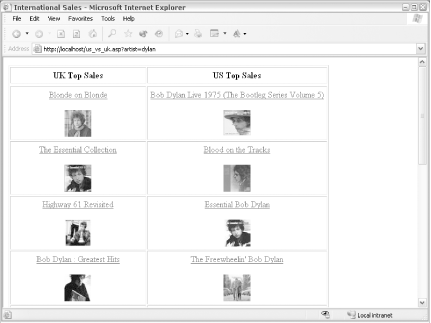 This code is also using the SmallImageURL value to display an image. The images come from their respective servers, so half are from the images-eu.amazon.com server, while the rest are from images.amazon.com.  |
| [ Team LiB ] |
|


