

Enough theory! Let's write some code and see how this works. Working with ADO.NET can be complex, but for many queries, the model is surprisingly simple.
In this example, you'll create a simple Windows Form, with a single listbox in it called lbCustomers. You'll populate this listbox with bits of information from the Customers table in the Northwind database.
Begin by creating a DataAdapter object:
Dim myDataAdapter As New SqlDataAdapter( _
  commandString, connectionString)
The two parameters are commandString and connectionString. The commandString is the SQL statement that will generate the data you want in your DataSet:
Dim commandString As String = _
  "Select CompanyName, ContactName from Customers"
The connectionString is whatever string is needed to connect to the database. In my case, I'm running SQL Server on my development machine where I have left the system administrator (sa) password blank (I know, I know, not a good idea. I'll fix it by the time this book is released. Honest.):
Dim connectionString As String = _
    "server=localhost; uid=sa; pwd=; database=northwind"
With the DataAdapter in hand, you're ready to create the DataSet and fill it with the data that you obtain from the SQL select statement:
Dim myDataSet As New DataSet( )
myDataAdapter.Fill(myDataSet, "Customers")
That's it. You now have a DataSet, and you can query, manipulate, and otherwise manage the data. The DataSet has a collection of tables; you care only about the first one because you've retrieved only a single record:
DataTable dataTable = DataSet.Tables[0]
You can extract the rows you've retrieved with the SQL statement and add the data to the listbox:
Dim tempRow As DataRow
For Each tempRow In myDataTable.Rows
    lbCustomers.Items.Add((tempRow("CompanyName") & _
      " (" & tempRow("ContactName") & ")"))
Next
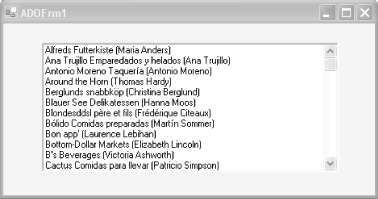
The listbox is filled with the company name and contact name from the table in the database, according to the SQL statement we passed in. Example 14-1 contains the complete source for this example.
Option Strict On
Imports System
Imports System.Drawing
Imports System.Collections
Imports System.ComponentModel
Imports System.Windows.Forms
Imports System.Data
Imports System.Data.SqlClient

Public Class ADOForm1
    Inherits System.Windows.Forms.Form

    Private components As System.ComponentModel.Container
    Private lbCustomers As System.Windows.Forms.ListBox

    Public Sub New( )
        InitializeComponent( )

        ' connect to my local server, northwind db
        Dim connectionString As String = _
            "server=localhost; " & _
            "uid=sa; " & _
            "pwd=YourPassword; " & _
            "database=northwind"

        ' get records from the customers table
        Dim commandString As String = _
          "Select CompanyName, ContactName from Customers"

        ' create the data set command object
        ' and the myDataSet
        Dim myDataAdapter As New SqlDataAdapter( _
          commandString, connectionString)

        Dim myDataSet As New DataSet( )

        ' fill the data set object
        myDataAdapter.Fill(myDataSet, "Customers")

        ' Get the one table from the myDataSet
        Dim myDataTable As DataTable = myDataSet.Tables(0)

        ' for each row in the table, display the info
        Dim tempRow As DataRow
        For Each tempRow In myDataTable.Rows
            lbCustomers.Items.Add((tempRow("CompanyName") & _
              " (" & tempRow("ContactName") & ")"))
        Next

    End Sub 'New

    Private Sub InitializeComponent( )
        Me.components = New System.ComponentModel.Container( )
        Me.lbCustomers = New System.Windows.Forms.ListBox( )
        lbCustomers.Location = New System.Drawing.Point(48, 24)
        lbCustomers.Size = New System.Drawing.Size(368, 160)
        lbCustomers.TabIndex = 0
        Me.Text = "ADOFrm1"
        Me.AutoScaleBaseSize = New System.Drawing.Size(5, 13)
        Me.ClientSize = New System.Drawing.Size(464, 273)
        Me.Controls.Add(lbCustomers)
    End Sub 'InitializeComponent

    Public Overloads Shared Sub Main(ByVal args( ) As String)
        Application.Run(New ADOForm1( ))
    End Sub 'Main
End Class 'ADOForm1
With just a few lines of code, you have extracted a set of data from the database and displayed it in the listbox, as shown in Figure 14-1.
These lines of code accomplish the following tasks:
Create the string for the connection:
Dim connectionString As String = _
"server=localhost; uid=sa; pwd=; database=northwind"
Create the string for the select statement:
Dim commandString As String = _
  "Select CompanyName, ContactName from Customers"
Create the DataAdapter and pass in the selection and connection strings:
Dim myDataAdapter As New SqlDataAdapter( _
  commandString, connectionString)
Create a new DataSet object:
Dim myDataSet As New DataSet( )
Fill the DataSet from the Customers table using the DataAdapter:
myDataAdapter.Fill(myDataSet, "Customers")
Extract the DataTable from the DataSet:
Dim myDataTable As DataTable = myDataSet.Tables(0)
Use the DataTable to fill the listbox:
Dim tempRow As DataRow
For Each tempRow In myDataTable.Rows
    lbCustomers.Items.Add((tempRow("CompanyName") & _
      " (" & tempRow("ContactName") & ")"))
Next
 |
|
|
| Top |