


|
|
|
11.1 Monitoring the Alert LogWhen an Oracle database is created, a file commonly referred to as the alert log is created. As errors and other conditions occur during processing, messages are logged to this file. Basically, every important event that occurs causes a record to be written to the alert log: when the database starts up, when it shuts down, and everything in between (e.g,. creating tablespaces and datafiles, performing privileged operations). Every important error message ends up in the alert log; in some cases, a message directs the DBA to a trace file that contains more detailed alert information. It is the responsibility of the DBA to monitor the alert log on a regular basis so as to deal with any problems or potential security issues before they affect the database or its users. The sooner you find out about error conditions, the better; unlike wine and cheese, database problems don't improve with age. Monitoring the alert log can be a challenge, however: there is an alert log for every database, and busy DBAs have many other things to do that are more pressing than manually scanning alert log files. As somewhat dyed-in-the-wool geeks,[1] your authors find that the thought of spending valuable daily minutes manually poring over database alert logs sends shivers up and down our workstations. Frankly, trawling through alert logs makes for a great insomnia cure, but it's hard to fit into the day.
To automate this tedious process and help DBAs keep close watch over their databases, we've written a collection of scripts designed to monitor the Oracle alert logs in real time and to report directly to the DBA the instant a database problem is detected. These scripts let you configure what to look for in the alert log and the email addresses to which to send messages. In addition, they allow messages to be mailed individually or batched up (depending on platform) and to be sent either immediately or at particular time intervals. 11.1.1 Where is the Alert Log?The location and name of the file containing the alert log are operating system and version-dependent; they may also be subject to local DBA standards or the caprice of a third-party application's enforcing its own standards for the location of the alert log. Given a database of the name orcl, the alert log may normally be found at either of these locations on Unix systems: $ORACLE_HOME/admin/orcl/bdump/alert_orcl.log $ORACLE_BASE/admin/orcl/bdump/alert_orcl.log On Win32 systems it would likely be found at: %ORACLE_HOME%\admin\orcl\bdump\orclALRT.log 11.1.2 Monitoring with chkalert.plThe chkalert.pl script is at the center of the toolkit alert-monitoring application. This Perl script provides the following capabilities:
This script runs in the background as a daemon on Unix. A version of it, ckalert_NT.pl, runs as a service on Win32. One particularly important feature of chkalert.pl is the set of configurable controls it provides in an effort to prevent error messages from overwhelming your mail server. You may wonder what terrible circumstances would generate so many error messages that it could bring a mail server to its knees! Actually, this happens more than you would imagine. A relatively common example is an imperfectly tested program that ignores error messages and continues to attempt the same operation over and over. For example, consider a PL/SQL routine that collects records from an OLTP system and inserts them into a data warehouse. After a month of record-breaking sales, the warehouse table chews through all the available space allocated for that month — suddenly, you'll run into a brick wall in the form of an Oracle error such as the following: ORA-1653 unable to extend table MY_TABLE by 16 in tablespace OLTP_DATA. A reasonable and well-behaved PL/SQL routine would catch this error and abort the process, notifying someone of the problem. However, if a miscreant piece of code fails to catch an exception of this kind, it can easily generate thousands of error messages in a very short time. This can keep a mail server very busy! The problem is compounded when the receivers of such emails are running a mail filter, such as procmail, which spawns a new process for each email received. This can easily cause your company's mail server to suddenly display poorer performance than the old Commodore 64 you still have in your closet (don't try to deny it). As you can well imagine, system administrators are somewhat less than amused by such denials of service, especially when they occur in the wee hours of the morning. And let's face it, things like this always occur in the wee hours of the morning. We like our own sysadmins, and try to avoid giving them reasons to feel otherwise about us, so we use chkalert.pl to keep mail server disasters from occurring. 11.1.3 Installing and Configuring chkalert on UnixIf you followed the installation instructions in Chapter 9, the Unix version of the alert-monitoring script, chkalert.pl, will already be installed on your system. You'll find it in the same location as the other executable scripts, most likely in /usr/local/bin. (As long as PATH includes the script installation directory, your system will find it.) Once underway, the Perl daemon carries out the following tasks (all of which can be configured) 11.1.3.1 chkalert.confThe first installation step is to locate and update the chkalert.conf configuration file used by the chkalert.pl script. The configuration file contains settings for the parameters used to control alert monitoring at your site. Default settings are provided in the configuration file that is included in the toolkit when you first install it. You can then edit this file as desired. We perform this editing process as follows:
There are just a few parameters you'll need to modify. We've reproduced the configuration file from the PDBA distribution in Example 11-1. Following the example we describe the main parameters you can specify in the file. Example 11-1. Configuration for chkalert.pl — chkalert.confpackage chkalert;
use vars qw{ %ckConf };
%ckConf = (
# recipients of email for alert log errors
dbaAddresses => [qw{ scott@tiger.com 7775551212@mobile.att.net }],
# mail addresses for debugging
debugDBA => [qw{someone@somewhere.com}],
oratabFile => '/etc/oratab',
# or whatever the location of your oratab file is
# it consists of the instance name, Oracle_Home and
# a flag field of Y or N.
alarmTime => 300,
# this is the number of seconds to wait before sending
# a batch of error messages as email
# this is batched to prevent large numbers of email
maxLogLines => 100,
# this is the override for alarmTime. If maxLogLines
# of messages are received, mail them now
watchdogLength => 5,
# this is the max size of the array used to
# determine if too much mail is being sent too fast
watchdogTime => 10,
# this is the elapsed number of seconds between email
# batches that is used to determine if mail is being
# sent too quickly
# if the time between the first and last times in the
# watchdog buffer is <
# ( watchdog[watchdogLength] - watchdog[0] )
# * ( watchdogLength * watchdogTime )
# then the mail delivery is throttled back until things slow down
throttleDelaySeconds => 10,
# how many seconds to delay between email batches
# when many errors are being generated
# this is to protect the system from being choked
# with procmail processes if you are using it
# what is the name of this server?
serverName => 'sherlock.jks.com',
# list of errors to check for
# must be a comma separated list of regular expressions
# e.g. errorList = ^ORA-, ^TNS-, crash
# the qw operator may also be used
errorList => qw{^ORA- ^TNS- crash},
);
1;
Here are the configuration file parameters:
11.1.3.2 Running chkalert.plWe're now ready to run chkalert.pl to see how it works. Let's test it first, on a copy of an alert log in which we've generated our own error messages:
11.1.3.3 Testing with a real alert logThis time we'll execute chkalert.pl against a real alert log without the previous -debug option. This forces chkalert.pl to run as a daemon process: $ chkalert.pl -sendmail -database ts01 \
-alertlog $ORACLE_HOME/admin/ts01/bdump/alert_ts01.log
DATABASE: ts01
ALERT LOG: /u02/app/oracle/product/8.1.7/admin/ts01/bdump/alert_ts01.log
DBA's : oradba@yourdomain.com 7775551212@mobile.att.net
We're set. If you've included your cell phone or pager number as one of the email addresses and if the database has a sudden problem at 2:00 AM, you'll get the call first so you can deal with it. You'll then be able to stroll casually into your office at 8:45 AM without anyone ever knowing there was a problem. No more angry mobs ambushing you in the car park, no more smirkers loafing round the coffee machine waiting for the DBA to fix the database, no more sudden surprises.[3]
Just to maintain this blissful nirvana moment and help ensure that chkalert.pl is always running, you might want to schedule it to start periodically via your system scheduler (often cron on Unix systems). When chkalert.pl starts, it creates a lock on a temporary baton file of the form /tmp/chkalert.$ORACLE_SID. Subsequent attempts to run chkalert.pl on the same database will fail when the file lock operation is attempted. This is harmless, because chkalert.pl merely exits when it's unable to lock the temporary baton file. If you need to terminate the chkalert.pl daemon, it's easily done via chkalert.pl's own -kill option. When chkalert.pl starts, it creates a temporary file containing its own process ID — sort of like an Apache .pid file. The -kill option tells chkalert.pl to open that file, in read-only mode, and use its artificial intelligence, glowing red eyes, and liquid metal, to locate the PID of the running process. Once tracked down, the process is terminated. The file containing the process ID is always named chkalert.<database>. On our Unix server for instance, the database is named ts01. When chkalert.pl is started, a file named chkalert.ts01 is created. On Unix systems this file is created in the /tmp directory, and on Win32 servers it's created in C:\TEMP. The contents of this file are fairly simple: $ cat /tmp/chkalert.ts01
15575
The following is an example of stopping a currently running chkalert.pl daemon. All of the command-line options are summarized in Table 11-1: oramon > chkalert.pl -database ts01 -kill
DATABASE: ts01
ALERT LOG: /u02/app/oracle/product/8.1.7/admin/ts01/bdump/alert_ts01.log
DBA's : someone@somewhere.com 7775551212@mobile.att.net
chkalert process 3790 killed
11.1.4 Installing and Configuring chkalert_NT.pl for Win32So far, we've been focusing on how to do alert monitoring on Unix systems. The methods for handling background processes differ significantly for Win32, and as we mentioned, there is a separate script for Win32. That script, chkalert_NT.pl, was installed along with the rest of the toolkit. This script is dependent on the Win32::Daemon Perl module, also installed in Chapter 9, which allows chkalert_NT.pl to run as a service. These are the main configuration steps. Note that in many cases, the installation is the same for Unix and Win32, so we'll refer to the earlier Unix discussion where appropriate:
11.1.4.1 Starting the serviceNow that chkalert_NT.pl has been installed, we fire up the Win32 Service Manager to start the service. You can navigate to this tool with one of the following sets of keystrokes. (Note that Service Manager works much the same on the two platforms.) Figure 11-1 is an example of what you should see in Service Manager after successfully installing chkalert_NT.pl. The new service appears as Oracle_ts20_AlertLogMon. Simply click on the Start button, and your alert log monitor should be off and running. (If this install fails to go smoothly the first time around, check Chapter 9 for all the modules required by chkalert_NT.pl.) Figure 11-1. The new Oracle_ts20_AlertLogMon service If the install should have the temerity to run imperfectly first time out, you may see a screen like that shown in Figure 11-2. You will need to go to the command line to try to sort it out. Check to see if Perl can compile the script: C:> perl -cw c:\perl\bin\chkalert_NT.pl You can see the results of that in the following: Can't locate Win32/Daemon.pm in @INC (@INC contains: C:/Perl/lib C:/Perl/site/lib .) at c:\perl\bin\chkalert_NT.pl line 10. BEGIN failed--compilation aborted at c:\perl\bin\chkalert_NT.pl line 10. It appears that we missed installing the Win32::Daemon module. Should something like this happen, go back and review the installation instructions in Chapter 9 to make sure that all the required elements were installed. Figure 11-2. Oracle_ts20_AlertLogMon service failure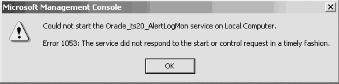 After re-installing Win32::Daemon to its former glory (we kept removing it in our test runs), the compile was successful, producing this output: c:\perl\bin\chkalert_NT.pl syntax OK If you continue to experience difficulties in running the service, make sure that the fully qualified file name, specified for the alert log during chkalert_service.pl installation, is correct. If it is incorrect, it won't cause an error until you attempt to restart the service. 11.1.4.2 Testing Oracle_SID_AlertLogMonNow that we have the Oracle_SID_AlertLogMon service running, we can verify that it's working as expected. Carry out this test only while a test database is down, as we need to directly edit its alert log.
The command-line options for chkalert_NT.pl are listed in Table 11-3; note that they differ somewhat from the earlier Unix list. If you want to change any of these, you will need to remove the alert checking service, modify chkalert_service.pl and then reinstall the service.
|
|
|
|


