


|
|
|
DBI Class MethodsBefore we connect to Oracle, we must establish a few DBI variable-naming conventions (listed in Table B-1).
connectThe connect Perl DBI constructor method generates our main database handle, $dbh: use DBI;
my $data_source = "dbi:Oracle:orcl";
my $user = "scott";
my $password = "tiger";
my %attr = (RaiseError => 0, AutoCommit => 1);
my $dbh = DBI->connect($data_source, $username, $password, \%attr)
or die $DBI::errstr;
Note the following characteristics of the connection string held above in $data_source:
Looking inside the $dbh variableAssuming that everything goes well, we should now have a valid database handle stored in the $dbh variable. But what's actually inside this? Let's find out: my $dbh = DBI->connect('dbi:Oracle:orcl', 'scott', 'tiger');
print "dbh >", $dbh, "<\n";
Blessed references give us both the class label and an object reference: dbh >DBI::db=HASH(0x466cd40)< What we have in $dbh is the key to a DBI::db object. However, Perl DBI is unusual in Perl. It operates within a hierarchy of objects rather than just one. As well as having DBI::db objects, we later hang SQL statement objects off these objects (like baubles from a Christmas tree). Each database handle gets its own collection of statement handles. This hierarchy can be seen in Figure B-1. Figure B-1. Database handles and statement handles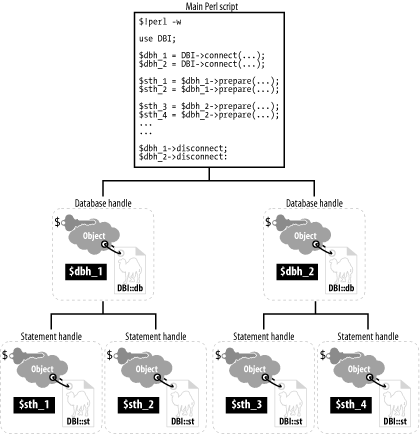 Each of these handles can also be assigned its own collection of initial and modifiable attributes. Let's see that connection code again: my %attr = (RaiseError => 0, AutoCommit => 1);
$dbh = DBI->connect($data_source, $username, $password, \%attr );
You'll often see variations on this theme, with anonymous hashes used instead: $dbh = DBI->connect($data_source, $username, $password,
{RaiseError => 0, AutoCommit => 1} ); # Anon. Hash
We cover the main generic handle attributes in Table B-2 (many of these are read-only) and the database handle specific attributes in Table B-3. Reading and occasionally resetting these attributes is straightforward: $old_value = $h->{AttributeName}; # Reading
$h->{AttributeName} = $some_new_value; # Setting
Alternative Oracle connection scenariosThere are several alternatives for connecting to Oracle. You can use the first alternative, shown in the following example, if you don't have access to a tnsnames.ora file: $dbh = DBI->connect("dbi:Oracle:host=myhost.com;sid=orcl",
$username, $password);
You can specify the port number in the connection, as shown in the next example. If you don't specify the port number, DBD::Oracle will try ports 1526 and 1521 in that order. Other variations, which are particularly appropriate for older SQL*Net systems, can be used if TWO_TASK or ORACLE_SID have not been set: $dbh = DBI->connect('dbi:Oracle:T:Machine:sid','username','password');
$dbh = DBI->connect('dbi:Oracle:','username@T:Machine:sid','password');
$dbh = DBI->connect('dbi:Oracle:','username@orcl','password');
$dbh = DBI->connect('dbi:Oracle:orcl','username','password');
$dbh = DBI->connect('dbi:Oracle:orcl','username/password','');
$dbh = DBI->connect('dbi:Oracle:host=foobar;sid=orcl;port=1521',
'scott/tiger', '');
$dbh = DBI->connect('dbi:Oracle:',
q{scott/tiger@(DESCRIPTION=(ADDRESS=(PROTOCOL=TCP)(HOST=myhost)
(PORT=1521))(CONNECT_DATA=(SID=orcl)))}, "");
Oracle-specific connection attributesYou can select three connection attributes especially for Oracle:
DBI->connect($dsn, $user, $passwd, { ora_module_name => $0 } );
connect_cachedThe connect_cached method is virtually identical in appearance to connect, described in the previous section: $dbh = DBI->connect_cached($data_source, $username, $password, \%attr); New database handles are cached. Whenever another call is now made to connect_cached using identical connection parameters, the cached database handle is returned if it is still available. If the handle is not available, a new one is created, as with connect. available_driversThe available_drivers method lets us know which DBD drivers (such as DBD::Oracle) are available on the system: @ary = DBI->available_drivers; data_sourcesThe data_sources method lists the available database targets. This method is useful for populating drop-down CGI or Perl/Tk boxes to choose a target database before connection. If no `Oracle' parameter is supplied, the environmental variable DBI_DRIVER is assumed: @ary = DBI->data_sources('Oracle');
(DBD::Oracle reads oratab and tnsnames.ora to get this information.) traceThe trace method lets you set the desired debug trace level. Various debug trace levels (shown in Table B-4) are possible under DBI. The default is to turn off tracing.
Typical calls might look like this: DBI->trace(0); # Turn tracing off.
DBI->trace(1); # Turn tracing on, STDERR output.
DBI->trace(2, "my_trace_file.txt"); # Increase trace level, and
# redirect to named file.
For further trace ability, Perl DBI also holds the very latest handle information in the following handles:
Let's test this by setting up a piece of code we know will go wrong: $sth = $dbh->prepare('SELECT Should_go_wrong" from dual'); # Quote! :)
print "DBI::err: >", $DBI::err, "<\n";
print "DBI::errstr: >", $DBI::errstr, "<\n";
This produces the following output: DBI->err: >1740< DBI->errstr: >ORA-01740: missing double quote in identifier (DBD ERROR: OCIStmtPrepare)< |
|
|
|
